
What is the first Sort Them Ducks upgrade I should buy?
Community consensus: Auto-Collect Matching Ducks (~15), then Bigger Inventory, then Auto-Shelve.

Sort Them Ducks upgrades: Auto-Collect, inventory, Auto-Shelve, sprint, highlights, and QuackPOT. Community buy order listed. Verified August 2026.
Watch a tips pass that covers upgrade timing while you sort the shop.
~5 min read
This Sort Them Ducks upgrades page is the buy-order sheet: Auto-Collect, inventory, Auto-Shelve, movement, highlights, and the QuackPOT machine. Sort Them Ducks pays cash for every correct duck; you spend it on a board in the shop. Costs below are community-observed from Mr.Duck’s Steam build and can change. Verified August 17, 2026 · Steam.
| Family | What it changes |
|---|---|
| Collect | Auto-Collect Matching · Nearby collect |
| Place | Auto-Shelve on Throw |
| Carry | Bigger Inventory (5 → 6 → 8 → 12+) |
| Move | Sprint · Crouch · Longer Reach · Stronger Throw |
| Find | Highlight Matching Ducks · Shelf Reveals |
| Wildcard | Mega Quack · QuackPOT rolls |
Matched by build plan, shared topics, and guide progression — not random related links.
Steam’s store copy names the families: carry more, move faster, highlight matches, reveal the correct shelf, auto-collect nearby. Community pages attach prices. If two videos disagree, treat the price as TBA and keep the effect.
| Upgrade | Community cost | Effect |
|---|---|---|
| Auto-Collect Matching Ducks | ~15 | While holding a duck, vacuum matching ducks until the bag is full |
| Auto-Shelve on Throw | ~10 | Throw at the correct shelf and it stacks |
| Bigger Inventory | ~4+ | Raise carry from 5 toward 12+ |
| Unlock Sprint | ~7 | Move across the shop faster |
| Stronger Throw | ~10 | Throw farther |
| Longer Reach | ~10 | Grab from deep piles and farther shelves |
| Highlight Matching | TBA | Glow copies of the duck in your hand |
| Shelf Reveals | TBA | Show which shelf accepts the held duck |
| Unlock Crouch | Cheap | Bottom-row shelves |
| Mega Quack | ~10 | Mystery / novelty — not a first buy |
| Nearby Collect | Mid–late | Pull nearby ducks without the matching vacuum |
Most of the board is passive once purchased. A few are active (hotkeys). That split matters for I Don’t Do Buttons — see the active section and the speedrun page. Auto-Shelve and Sprint help that challenge because they do not ask for an ability key.
Steam news on August 14 repaired save damage that could wipe upgrades, with ability refunds after the fix. If a board looks empty on an old save, verify files before you repurchase. Details: troubleshooting.
Knowing the names is not the same as spending in the right order.
A cozy Sort Them Ducks upgrades path and a 4-hour path share the same opening: vacuum, bag, auto-shelve. They diverge only after the shop is traversable.
| Priority | Buy | Why |
|---|---|---|
| 1 | Auto-Collect Matching | With a matching duck in hand, vacuum fills the carry cap with that theme |
| 2 | Bigger Inventory | The vacuum is wasted if it stops at five |
| 3 | Auto-Shelve on Throw | Removes the place animation once you can hit the right shelf |
| 4 | Sprint / Throw / Reach | Cut travel and deep-pile fumbles |
| 5 | Highlights / Shelf Reveals | When mixed piles stop being readable |
| 6 | Crouch | Whenever bottom rows start stealing minutes |
| 7 | QuackPOT leftovers | After the main board, for Jackpot! |
Casual runs can delay highlights. Timed runs want Auto-Shelve as early as the speedrun page says — throwing at a known shelf is the biggest time cut after the vacuum. Do not pretty-sort either way.
Community lists it around 10 bucks with an unclear payoff. Spend that ten on Auto-Shelve or throw range instead. Novelty upgrades exist for Maxed Out, not for the first cluster of shelves.
The slot machine is the other money sink. It has its own achievement.
QuackPOT is the shop’s slot-style machine. Jackpot! asks you to obtain every upgrade from it. It is easy to ignore while you are learning shelves.
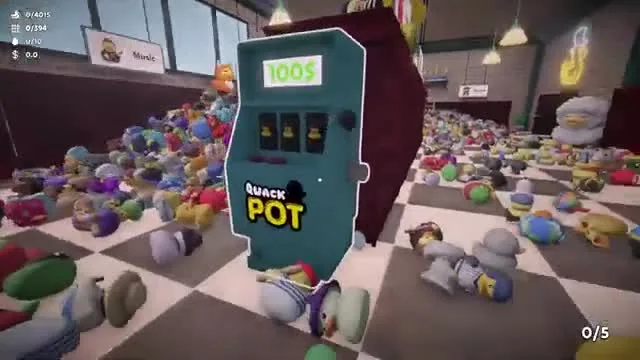
Feed the machine once Auto-Collect, inventory, and Auto-Shelve are online. Early rolls steal the 15 bucks that should have bought the vacuum. Community notes a limited dud pool — keep rolling once the main upgrades are done.
Slot-machine extras help I Don’t Do Buttons because they can buff a run without an ability press. They also help No Time to Waddle once the normal board is maxed. Pair with achievements.
If you are still asking which button is “active,” the next section is the one that fails that achievement.
Treat anything you must press (community: Find Duck / highlight on [1], Collect Ducks on [2]) as active until a patch says otherwise. Passive board buys — inventory, sprint, auto-shelve — are safe for I Don’t Do Buttons.
| Safe for no-buttons | Risky / active |
|---|---|
| Bigger Inventory | Highlight / Find Duck [1] |
| Sprint | Collect Ducks / matching vacuum [2] — reports conflict; skip to be sure |
| Auto-Shelve on Throw | Any hotkey listed on the ability icons |
| QuackPOT passives | Mega Quack if it requires a press |
Efficiency Expert wants 15 ducks from one Collect Ducks use — that is an active-ability achievement. Duck Whisperer wants 50 Find Duck uses. Do those on a normal 100% save, not on the no-buttons run.
Patch 2 fixed ability icons that flashed the wrong color. If the board looks possessed, update before you assume a missing purchase.
Maxed Out is the long cash sink once the challenge rules are clear.
Maxed Out is “fully upgrade every available upgrade.” It is a money achievement, not a skill check. Sort, buy, roll QuackPOT until the board and the machine are done.
A 4-hour run needs Auto-Shelve early, not a complete board. Finish Maxed Out on the casual save, then do dedicated challenge runs. Recommended 100% order lives on achievements.
Aug 14 save repair + refunds. Verify integrity, then check Steam news before you spend another 15 on Auto-Collect you already owned.
Community consensus: Auto-Collect Matching Ducks (~15), then Bigger Inventory, then Auto-Shelve.
Treat listed bucks as community-observed. If two sources disagree, trust the in-game board.
Reports conflict. For I Don’t Do Buttons, skip active collect/highlight keys and lean on Sprint, inventory, Auto-Shelve, and QuackPOT.
The shop slot machine. Jackpot! needs every upgrade from it.
The Aug 14 patch repaired save-file damage and refunded abilities. Verify game files.
Matched by build plan, shared topics, and guide progression — not random related links.